
Time to Trade Your Street Tires for Slicks
Running your virtualized network without using Enhanced Data Path (EDP) Standard virtual switch mode is like entering a Formula 1 race with street tires and stock parts. You might stay on the track, but you’re not setting any lap records — and you’re burning unnecessary fuel in every turn. EDP Standard is purpose-built for performance: it realigns threads, reduces processing drag, and keeps your workloads glued to the performance fast path. If you’re building infrastructure meant to handle speed, agility, and scale, EDP isn’t optional — it’s the race setup that gets you on pole!
EDP Standard brings the performance boost your VMware Cloud Foundation deployment needs — without the hassle of complex tuning. It intelligently handles network traffic with greater efficiency, improves CPU utilization, and boosts overall throughput. The result? Lower overhead, faster data movement, and a network stack that simply works better for modern workloads. If you’ve already invested in the infrastructure, it makes sense to run it at full potential.
What does EDP Standard actually do?
EDP Standard integrates several advanced NSX technologies to boost packet processing performance, scalability, and CPU efficiency in vSphere environments. The following key components of EDP work together to reduce overhead, optimize thread utilization, and accelerate network throughput:
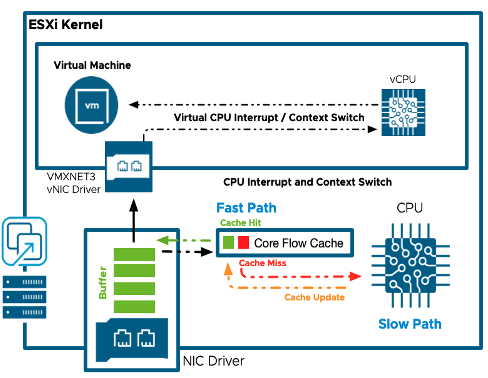
EDP Flow Cache (FC)
◦ Stores actions from initial packet processing (“slow path”) to expedite handling of future packets from the same flow (“fast path”).
◦ Enables run-to-completion behavior that reduces overhead and boosts throughput.
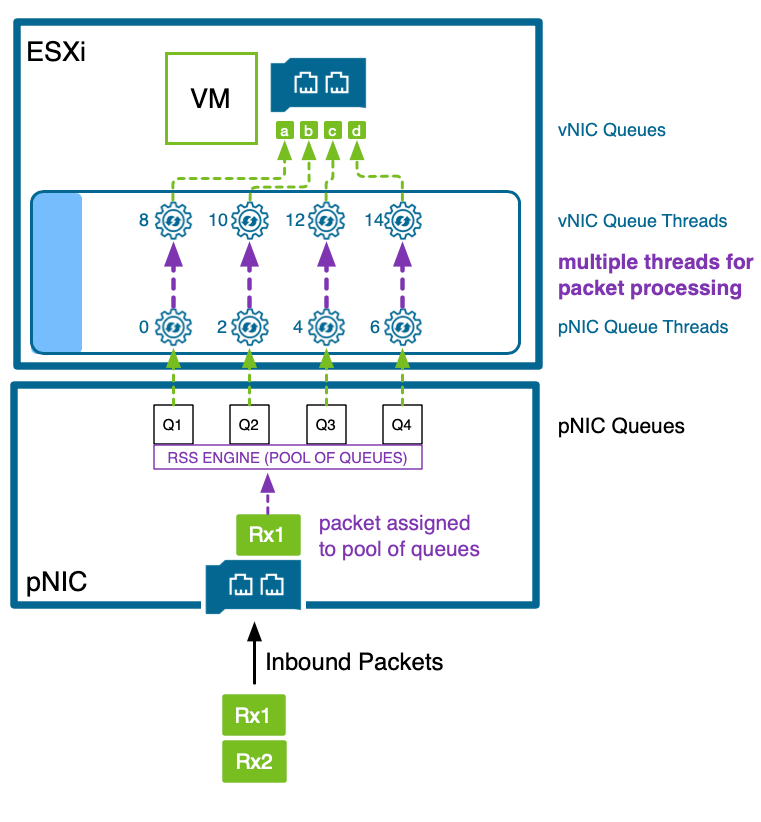
Thread Load Balancer (TLB)
◦ Dynamically allocates and aligns packet processing threads (“EnsNetWorlds”) with vNIC/pNIC queues.
◦ Optimizes performance by ensuring NUMA alignment and real-time load distribution.
EDP Mbuf Framework
◦ Replaces the legacy PktHandle structure with a lightweight, 128-byte mbuf format (based on Intel DPDK).
◦ Reduces cache footprint by ~50%, enhancing packet throughput and memory efficiency.
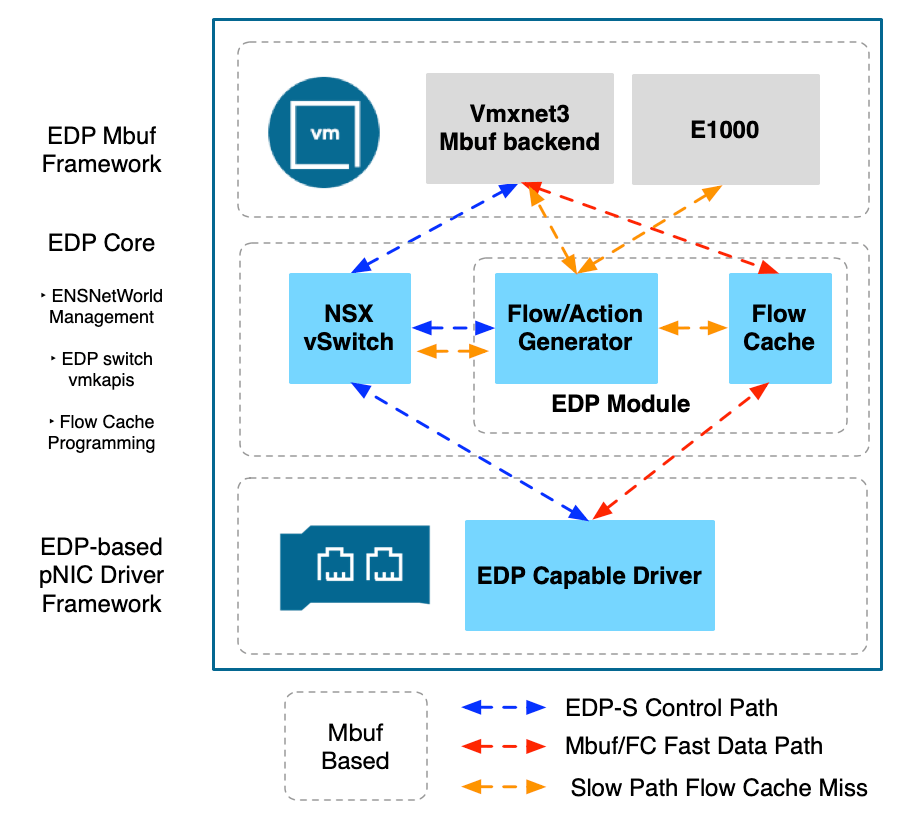
EDP Standard is architected to work with advanced network performance technologies such as NetQueue, Receive Side Scaling (RSS), TCP Segmentation Offload (TSO), Large Receive Offload (LRO), and NUMA-aware scheduling. These optimizations are automatically configured — and fine-tuned — by default on EDP-enabled hosts. As a result, EDP not only eliminates the need for manual performance tuning on ESXi, it consistently outperforms the legacy Standard mode tuning approaches.
My Version Recommendations
EDP Standard is the recommended virtual switch mode for all VMware Cloud Foundation deployments running vSphere 8.0 Update 3e (P05) with NSX 4.2.2 This combo sets the baseline for long-term support and delivers the best results across NSX Edge clusters, compute clusters, and performance-sensitive environments. Other versions might work, but for reliable performance and fewer headaches down the road, this is the one to use.
- ☑️ Best Practice #1: Enable EDP Standard in every new or greenfield deployment with this version combo — even if you’re not chasing max throughput. It boosts CPU efficiency, reduces packet overhead, improves workload alignment, and gets your clusters ready for future performance demands.
🤫 Insider Insight: EDP Standard is becoming the default switch mode in an upcoming major release. Enabling it now with NSX 4.2.2 means you’ll skip the hassle of switching later.
- ☑️ Best Practice #2: For brownfield environments, always follow the Enabling EDP in Active Environments workflow. It ensures a smooth transition with zero disruption.
🛠️ Tip: The NSX 4.2.2 (Early June) release includes an NSX Manager script that automates this whole process. Just run it on a cluster and it will enable EDP one host at a time — no manual conversions, no downtime.
Note: The latest NSX 4.2.2 release (4.2.2.1) and subsequent updates are suitable for EDP .
Why NSX 4.2.2?
1. Enhanced Data Path in 4.2.2 is the LTS release.
EDP has been around for over seven years, originally designed for peak performance in Dedicated (Poll Mode) environments. Now that same engine is powering all virtual switches (in the next major release). A huge engineering effort went into mainstreaming EDP. Much of this effort has been back-ported to NSX 4.2.2 to make it the baseline for broad customer adoption.
2. NSX 4.2.2 It is suitable for all cluster types & use cases.
Earlier EDP versions worked well, but performance varied depending on the workload’s traffic pattern. With 4.2.2, you get consistent optimization across Edge, general compute, and high-throughput clusters.
3. Automated Enabling of EDP in brownfield deployments
NSX 4.2.2 includes tooling to automate EDP activation — no service disruption, no manual steps. Turning it on now gets you early access to the latest improvements, and I’m happy to collaborate with customers who want to give feedback.
Requirements
There is a page in the NSX install guide that provide an overview. There’s three key things:
- NSX has to be installed for EDP Standard to optimize DVGP VLANs, NSX VLAN segments, or NSX overlay segments. The BOM software versions matter. With VCF 5.2, you can use the flex bom to target NSX 4.2.2
- The pNIC model & driver must be certified for EDP Standard for the host switch mode to become successfully enabled. You can look for the Enhanced Data Path – Interrupt Mode feature in the Broadcom Compatibility Guide – IO Devices.
Note: EDP Standard = EDP Interrupt Mode. The former is the new & permanent name. Soon
What if the pNIC don’t support it? If you attempt to enable the mode NSX Manager will detect the missing EDP Standard capability and fall back to the legacy Standard mode. No harm no foul. - In environments without workloads, you can enable EDP Standard by selecting the mode in the NSX Transport Node Profile or Enhanced Data Path in VMware Cloud Foundation , this is the simplest way to enable the mode.
The grand conclusion
Now that NSX 4.2.2 is officially here, there’s really no reason to hold back. EDP Standard is stable, easy to enable, and delivers real-world performance gains right out of the box. Whether you’re running Edge clusters or general compute, you’ll get better efficiency, smarter CPU usage, and far fewer tuning headaches. Just enable it — let the system handle the rest. It’s ready for production when you are.
—Gabe
P.S. 😘 Guilty on the racing metaphors — we are getting deep into F1 season 75 over here, and our favorite team is crushing it in both championships.



[…] default, VMware Cloud Foundation (VCF) 9.0 will use the optimized Enhanced Data Path (EDP) Standard switch mode when configuring NSX, which will require you to have an EDP capable network adaptor. One way to […]
LikeLike
[…] Why is EDP Standard essential for VMware Cloud Foundation? […]
LikeLike