
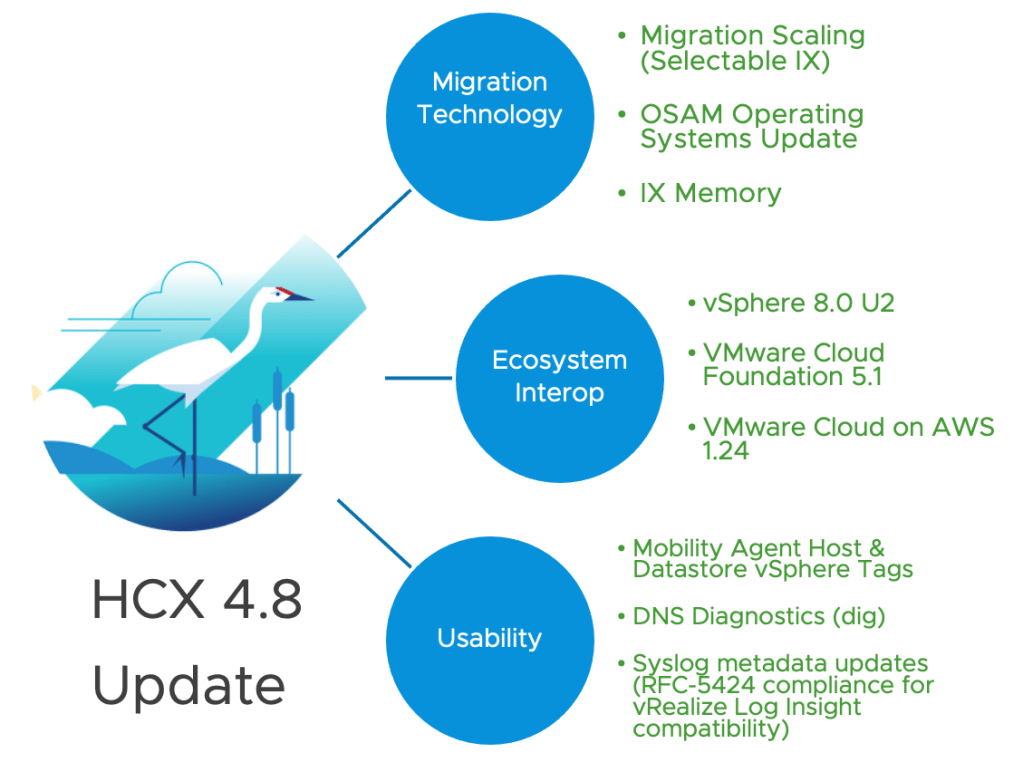
It gives me great pleasure to share that HCX 4.8 has been published globally to all of our HCX customers and to each and every connected system! My stork above summarizes the themes and key areas for this release. This post focuses on certain key updates, if you see something in the release note that wasn’t covered here, drop a comment!
Migration Scaling
You’ll notice a theme building over several connected releases. We have been evaluating our historical performance & scaling limitations and targeting areas that improve overall migration velocity.
We started down this path with the changes in HCX 4.7 (details in VMware KB 93605), allowing a user to double ongoing migration operations. HCX 4.8 overcomes cluster-centric scaling limitations:
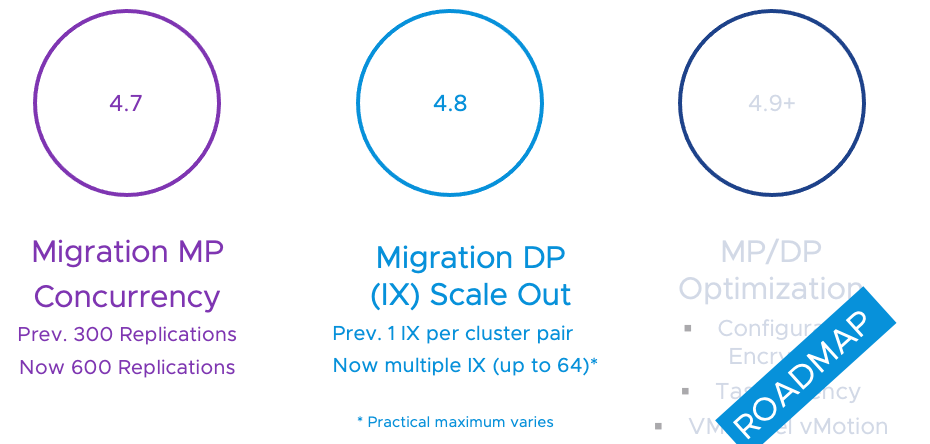
With Single-cluster multi-mesh scale out (Selectable Mesh)“, it is now possible to implement multiple migration appliances to spread the migration work inside of a cluster (this can be repeated for any cluster pairs previously limited to one mesh).
Imagine a migration from Cluster A at a source site to Cluster B at the target site (pictured below). For this scenario (prior to this release) a maximum of one migration appliance could be used to perform the work. With HCX 4.8, multiple meshes can be deployed for the same cluster set:
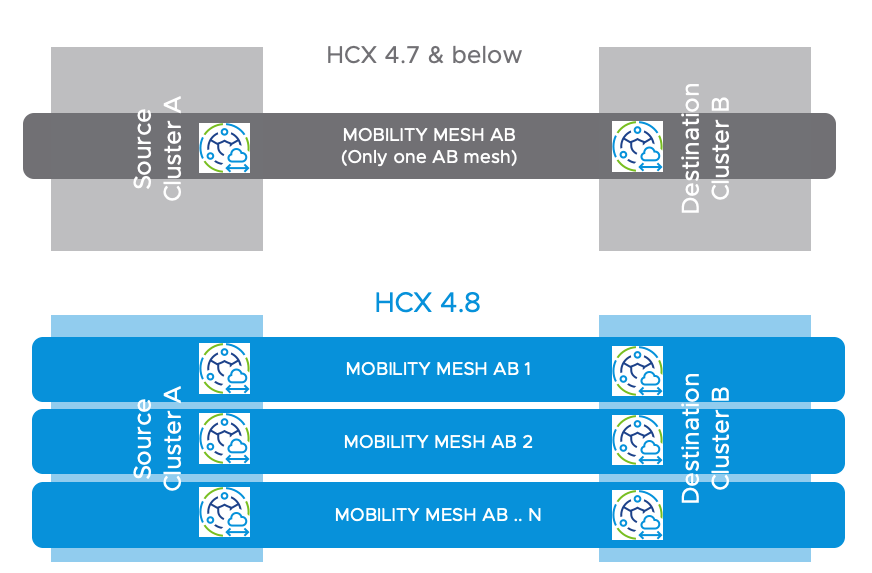
In an existing deployment, this can be as simple as creating your next Service Mesh
(1. create service mesh. 2. enable migration services 3. disable network extension 4. Use existing CP/NPs, make sure to have available IP addresses).

Migration operations in HCX 4.8 will have an Interconnect Options section with a dropdown where a specific mesh can be selected:

From a design perspective there are some things to consider:
- The IX appliance is the HCX migration data worker. It is always used when performing any HCX Cold Migration, HCX vMotion, Bulk Migration, Replication Assisted vMotion, or OS Assisted Migration. Creating more service meshes will result in more IXs.
- While an HCX Manager system can manage 300-600 replication-based migrations simultaneously (depending on version & config), each IX appliance can drive a maximum of 200 replications concurrently.
- A single IX can handle 200 migrations:
- While 200 is possible, configuring 200 migrations is usually not the best approach.
- Various factors (like the rate of disk change collectively across all parallel migrations) will determine the sweet spot. The best approach is to experiment and see how much one IX appliance can handle, then scale out as needed.
- A single IX (without contention) can push approximately 2 – 2.5 Gbps of total data:
- If you scale out to 5 service meshes, (assuming sustained migration traffic) you could potentially push 10Gbps+ collectively across the appliances. That’s significant traffic. Make sure new site-to-site traffic is accounted for, and does not overrun critical application traffic.
- Using dedicated HCX Uplink/Migration networks makes it easier to observe and respond to HCX traffic volume.
- A single IX processes HCX vMotion and RAV switchovers will be processed serially.
- If you scale out to 5 service meshes, during the migration maintenance window, HCX will perform 5 live switchovers in parallel, until all parked migrations in wave queue have been processed.
- Scale out IX appliances to increase parallel live switchovers.
- Last but by far not least – this new way of migration in HCX 4.8 scaling opens up the potential to cross over vSphere product maximums in a way that was simply not possible with a single IX appliance for a cluster. The easiest way to think this is to count each HCX operation as a cross-site storage vMotion:
- each source datastore can tackle 8 in parallel.
- each source esxi host can handle 2 in parallel.
- same for the esxi host and datastores at the destination.
- Ultimately there is also some internal vCenter Server task limit that can eventually come into play. Tasks in a VC will reflect “Resources currently in use… etc” when a migration can’t progress due to these limits.
- I would suggest to design migration scale out by generally growing the IX scale roughly along with host count (as an IX maximum) while considering all the possible bottlenecks.
Ecosystem Interoperability
HCX is the way to adopt the latest and greatest from VMware by way of workload mobility.
✔️ HCX 4.8 for vSphere 8.0 Update 2
vSphere 8.0 U2 brings VM Hardware Version 21, emphasizes new performance capabilities for GPU workloads and many operational improvements to summarize cleanly here. See What’s New in 8.0 U2 details here.
HCX 4.8 is compatible (and required) for vSphere environments built on vSphere 8.0U2, previous HCX releases are not interoperable.
✔️ HCX 4.8 for VMware Cloud Foundation 5.1
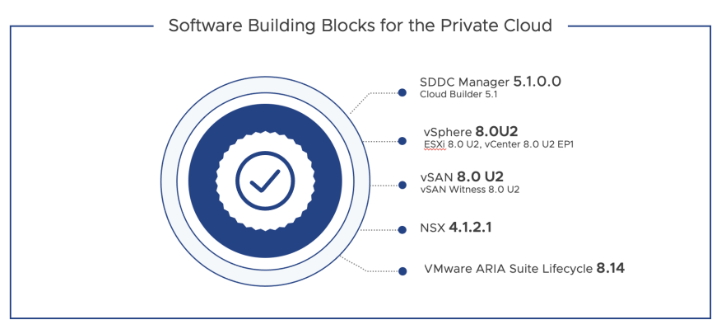
VMware Cloud Foundation 5.1 delivers key enhancements across storage, networking, compute and lifecycle management to enable customers to scale their private cloud environments and improve resiliency. See the VMware Cloud Foundation 5.1 announcement for the Software Bill of Materials and additional information.
HCX 4.8 is compatible (and required) for VCF 5.1, previous HCX releases are not interoperable
✔️ HCX 4.8 for VMware Cloud on AWS SDDC 1.24
SDDC version 1.24 is a major VMware Cloud on AWS release that includes an updated bill of materials, security and performance improvements, and introduces new capabilities like the vSAN Express Storage Architecture (ESA). See What’s New in VMware Cloud on AWS Version 1.24 for details!
HCX 4.8 is compatible (and required) for VMC-A SDDC 1.24, previous HCX releases are not interoperable.
Additional Information
There is much more to this release. We added new RHEL Operating Systems for OSAM migration. Increased the IX appliance memory to better support migrations and made many usability enhancements. Check out the HCX 4.8 Release Note for details!
Reference Links:
HCX 4.8 in Product Interoperability Matrix
HCX 4.8 in ports.vmware.com
HCX 4.8 in VMware Configuration Maximums
—
👨🏻💻Gabe
P.S. Happy Thanksgiving 2023 from my family to yours.




I really like the insights shared in this article.
HCX 4.8 has been released globally to all customers, with a focus on migration scaling and ecosystem interoperability. The update allows for multiple migration appliances to be used within a cluster, improving migration velocity. It also supports interoperability with vSphere 8.0 U2, VMware Cloud Foundation 5.1, and VMware Cloud on AWS SDDC 1.24. Other enhancements include support for RHEL Operating Systems and usability improvements.
Wayne
LikeLike