
We are unquestionably into the summer release season for VMware Cloud Foundation. If you missed the previous announcements, you can read those here:
- Introducing VMware Cloud Foundation 5.2: The Next Step in Private Cloud Modernization (by Sabina Anja, few weeks ago) provides a broad intro to the latest version of the VCF unified platform.
- Networking Enhancements in VMware Cloud Foundation 5.2 (published yesterday) highlights select new capabilities from the VCF Networking team across several products including NSX, HCX & Networks Ops (previously VRNI).
There is much to unpack in each of these technology areas, but today this will focus on what we’ve delivered in HCX.
⚠️ Before I dive in – some news: I’ve been recently commissioned to take on different technology within the VCF Networking family! (stay tuned for new subject matter)
To accommodate the shift, and in some sense to future proof for changing topics, hcx.design blog will redirect to vcfcore.tech. Links will work with both domain names.
What is HCX?
VMware Cloud Foundation’s workload mobility workhorse, providing easy to use options for connecting many types of technology stacks across sites, transforming traditional VLANS to modern workload overlays with a few clicks, and puts VMware’s best migration technology options at your fingertips. HCX can connect sites with disassociated management & identity components, it enables cross-CPU vendor migration, scheduled live migration & workload modernization at the largest scale. HCX technology is included with VMware Cloud Foundation.
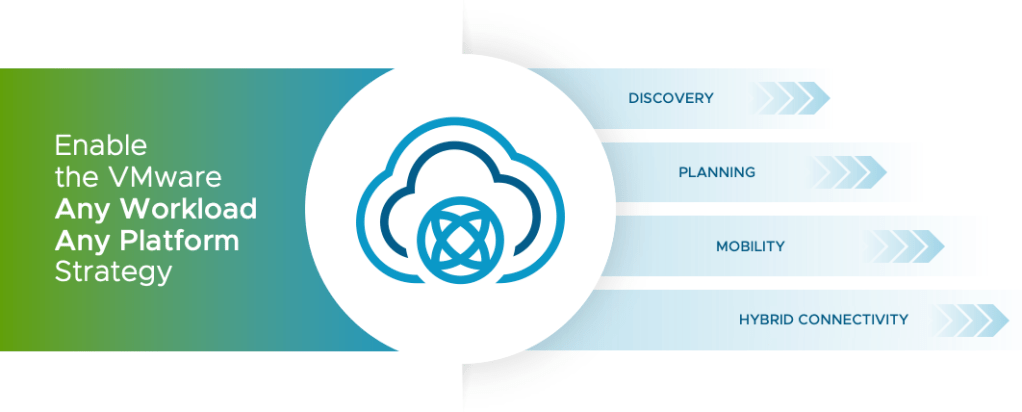
What’s New in HCX 4.10?
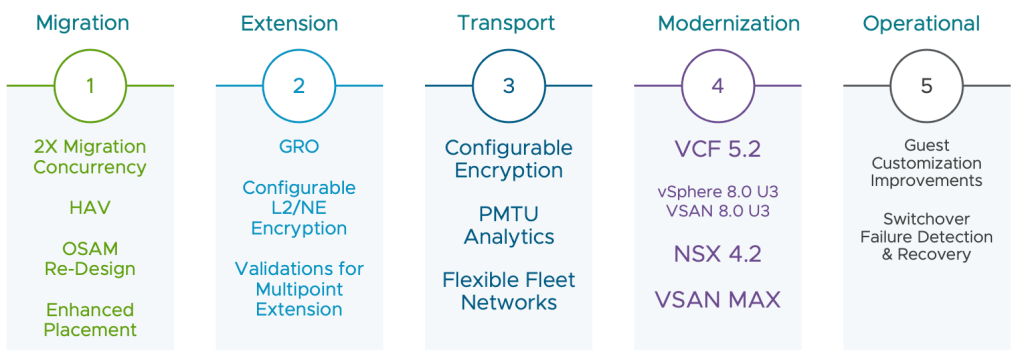
VCF 5.2 Ready
VMware HCX 4.10 is the only version that is fully compatible for a migration to VMware Cloud Foundation 5.2. Like always, HCX 4.10 is backwards compatible with previous releases, but it is now the minimum version required for the following software:
- vSphere 8.0 U3
- NSX 4.2
- VSAN 4.2
- VSAN MAX
Migration Management Plane Concurrency
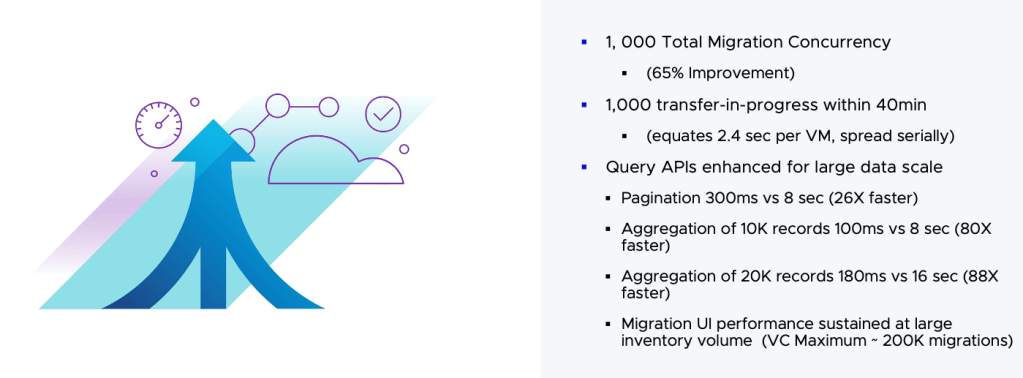
An HCX manager can now simultaneously execute 1000 migrations across the Mobility Meshes. The true wonder comes in the optimizations that came with this scale increase. if you look into recent concurrency limitations, you’ll find numbers like these:
HCX 4.6 and before: 300 replications (Bulk/RAV)
HCX 4.7 – 4.9: 600 replications (Bulk/RAV)
HCX 4.10: 1000 replications (Bulk/RAV)
Using a moving truck analogy, the improvement in 4.7 was like bolting on more cargo space.. 4.10 has the engine and supporting mechanisms to handle the additional load.
Note: To use HCX at maximum migration scale, follow the scaling instructions detailed in Broadcom KB 3733010 (different from the previous scaling KB)
HCX Assisted vMotion
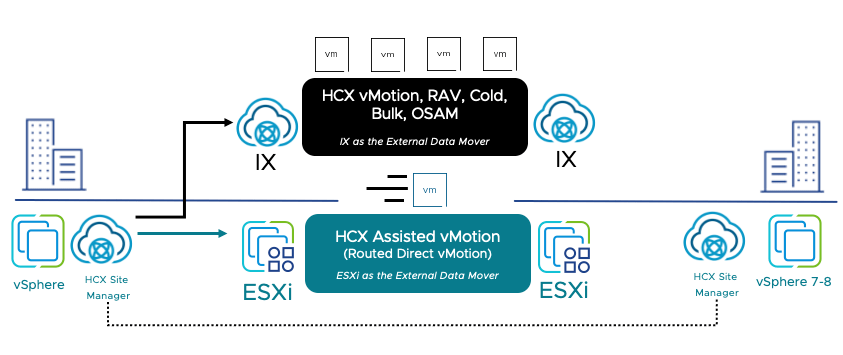
In the car analogy, vSphere vMotion the race car. A known and loved VMware mobiilty technology that allows you to live migrate virtual machines (VMs) between hosts, clusters, and entirely new VMware vSphere environments at near line rate.
- From vSphere 7.0U2 and beyond, vMotion multi-streaming allows for 25/40/100 GbE migrations.
- Encrypted workloads can migrated (across sites with matching native key provider or external KMS).
- vMotion for vGPU workloads.
HCX 4.10 unifies the experience by bringing its management & orchestration benefits. Native vSphere vMotion & Cross-vCenter vMotion can be launched from the HCX UI (look for HCX Assisted Migration). HAV on powered off virtual machines will trigger a Cold Migration using the provisioning network, or the Unified Data Transport (if that is configured).
OS Assisted Migration
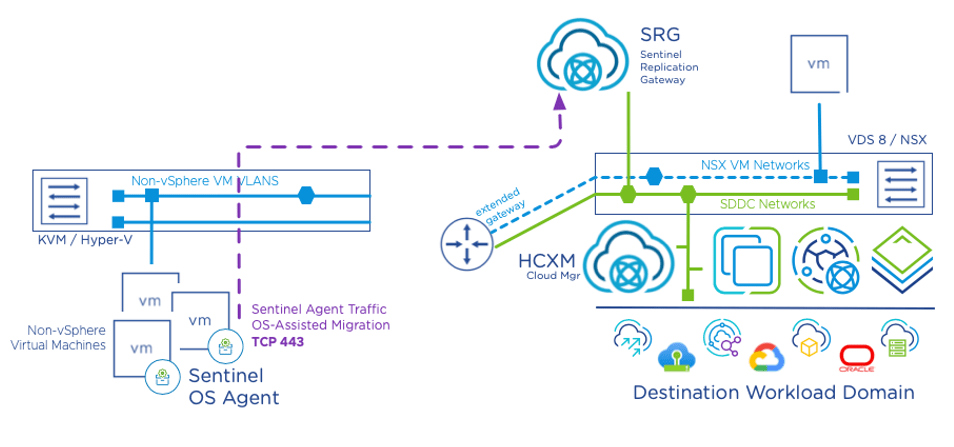
Several changes to the OSAM migration transport in HCX 4.10:
- There is significant footprint reduction and simplified migration datapath. This new model is very friendly to rack to rack conversions from non-vSphere virtual machines.
A vCenter can be prepared as an OSAM endpoint using a single HCX Manager, with one “SRG” appliance (Sentinel Replication Gateway. Sentinel-equipped VMs will reach out to the mothership and become available for migration. This new mode does not require the multi-site IX appliance set.
The previous “proxy” model is still available. - OSAM has been made an official supported path for archaic ESX environments (think 5.5, 6.0, 6.5/6.7) – you can migrate any workloads on the validated Operating Systems list. OSAM functionality is in a sense agnostic to the hypervisor hosting the workload, this is the next step in supporting VM Guest on any VM Host.
- New Operating Systems certified for OSAM Migration
- RHEL 8.9 , 9.0, 9.1, 9.2, 9.3 (64-bit) on KVM
- Ubuntu 20.04, 22.04
- Rocky Linux 8.4, 8.5, 8.6, 8.7, 8.8, 8.9
- Rocky Linux 9.0, 9.1, 9.2, 9.3
- With HCX 4.10, we’ve added the ability to perform migrations with yet-to-be certified Operating Systems. For example, RHEL 8.9 is officially certified, but RHEL 8.10 is not. While HCX 4.9 and older versions block the migration of a RHEL 8.10 guest, HCX 4.10 will not block it, but instead will provide a validation warning during migration stating that the OS is pending certification for official support.
Improved Migration Placements
During an HCX migration, when we select a landing cluster; it has an system to system ‘conversation’ about what hosts in the cluster are suitable for the migration. HCX sees various things like the host available datastores, memory, various aspects of capacity. In the end a list of suitable host candidates is generated.
The problem is that the older placement logic assigns the first entry in the filtered host list. This largely is a non-issue in the old per-cluster scaling model or smaller deployments. The problem primarily affects 4.8 deployments scaled out for performing multiple concurrent HCX RAV switchovers or HCX vMotions, because of the propensity to overrun host storage vmotion limits.
In HCX 4.10 – HCX is using internal tracking for selected hosts and datastores, and will query an internal comparator to minimize how often we are using one specific host/datastore in a case where many of them are equally suitable to land the migration.
In Conclusion
As we dive into the summer release season, it’s exciting to share updates like VMware Cloud Foundation 5.2 and enhancements in networking technologies. Today’s highlight is HCX 4.10, which brings significant improvements to VMware’s workload mobility capabilities. This release boosts migration velocity, introduces HCX Assisted vMotion for line-rate VM migrations driven from HCX, and reduces the footprint OS Assisted Migration. Additionally, improved migration placements ensure efficient resource use. Stay tuned for more updates from HCX and NSX as the blog transitions into vcfcore.tech.
Additional Resources
- Downloading the HCX 4.10
- VMware HCX 4.10 Release Note
- VMware HCX 4.10 Configuration Maximums
- VMware HCX 4.10 Ports & Protocols (Pending)
—
Gabe 🐒
P.S. Made it to the zoo with 5 of the 6 rug rats. My teenager turned me down (this is a first 😭.)

 VCF CORE ⦿ TECH